
Screenshots
App details
- Version
- 4.3.1
- Size
- 293.13 KB
- Updated
- July 11, 2023
- Requires
- Windows XP
- Language
- English
- License
- Free
- Developer
- Sweb
- Category
- Windows OS
SoftPas in:
This product is also available in the following languages:
About HotkeyP
Download HotkeyP – Free Keyboard Shortcut Tool for Windows (PC, Desktop, Productivity)
HotkeyP is a lightweight, free Windows utility that empowers users to create custom keyboard shortcuts for nearly every major function on their PC. Whether you want to lock your computer with a single key press, clear temporary files, minimize apps to the system tray, or restore desktop icons, HotkeyP simplifies these tasks with customizable hotkeys. Designed for both casual users and power users, this software enhances productivity by reducing mouse dependency and streamlining daily workflows. With over 3,000 downloads since its addition to our catalog in 2006, HotkeyP has proven its reliability across a wide range of Windows systems, including older versions like Windows 98. The latest version, 4.3.1, released on June 13, 2007, includes critical updates such as enhanced stability, new commands like "Magnifier" and "Delete temporary files," and improved tray icon visibility. Despite its age, HotkeyP remains a secure, efficient tool for those seeking a no-frills way to automate common PC tasks. It’s ideal for users who value speed, simplicity, and control—especially those in Bangladesh, Saudi Arabia, and other regions where lightweight software is highly valued.
Key Features of HotkeyP – Customize Your Windows Workflow
HotkeyP stands out in the crowded field of productivity tools due to its powerful yet simple feature set. One of its most valuable features is the ability to assign keyboard shortcuts to core system functions that aren’t natively accessible via hotkeys. For example, you can instantly lock your computer with a single keystroke instead of navigating through the Start menu or pressing Ctrl+Alt+Del. Similarly, commands like "Minimize to tray," "Hide application," and "Clear recent documents" help maintain a clean desktop and improve workflow efficiency. The software also supports advanced automation with the "Paste text" command, which allows users to define multiple strings separated by the %| delimiter—perfect for inserting frequently used phrases or code snippets.
Another standout feature is the built-in HotkeyP Spy, a small utility that lets you monitor and capture system values in real time. The Spy window is resizeable and includes buttons to copy data directly to the clipboard or into the HotkeyP interface, making it ideal for testing and debugging custom shortcuts. Additionally, the program now offers a visual cue in the system tray: when mouse shortcuts are disabled, the icon changes from an 'X' to a '/', improving user awareness. Security-conscious users will appreciate the option to disable the display of "Password:***" when the computer is locked, enhancing privacy during shared use.
HotkeyP also supports dynamic command parameters. For instance, using %l in a "Show text" command displays the current clipboard content, enabling context-aware automation. This level of flexibility makes it suitable for both beginners and advanced users. With support for older Windows systems like Windows 98, it remains accessible to users with legacy hardware. Whether you're managing a personal computer or a workplace machine, HotkeyP delivers a reliable, secure, and lightweight way to boost productivity without bloating your system.
How to Install and Use HotkeyP – Step-by-Step Guide
Installing HotkeyP is a straightforward process that takes less than a minute. Begin by downloading the latest version, 4.3.1, from a trusted source. The installer is compact, requiring minimal disk space—ideal for older systems or those with limited storage. Once downloaded, run the executable file and follow the on-screen prompts. The setup wizard is minimal and does not include bundled software or adware, ensuring a clean installation. After installation, HotkeyP runs in the background, accessible via the system tray.
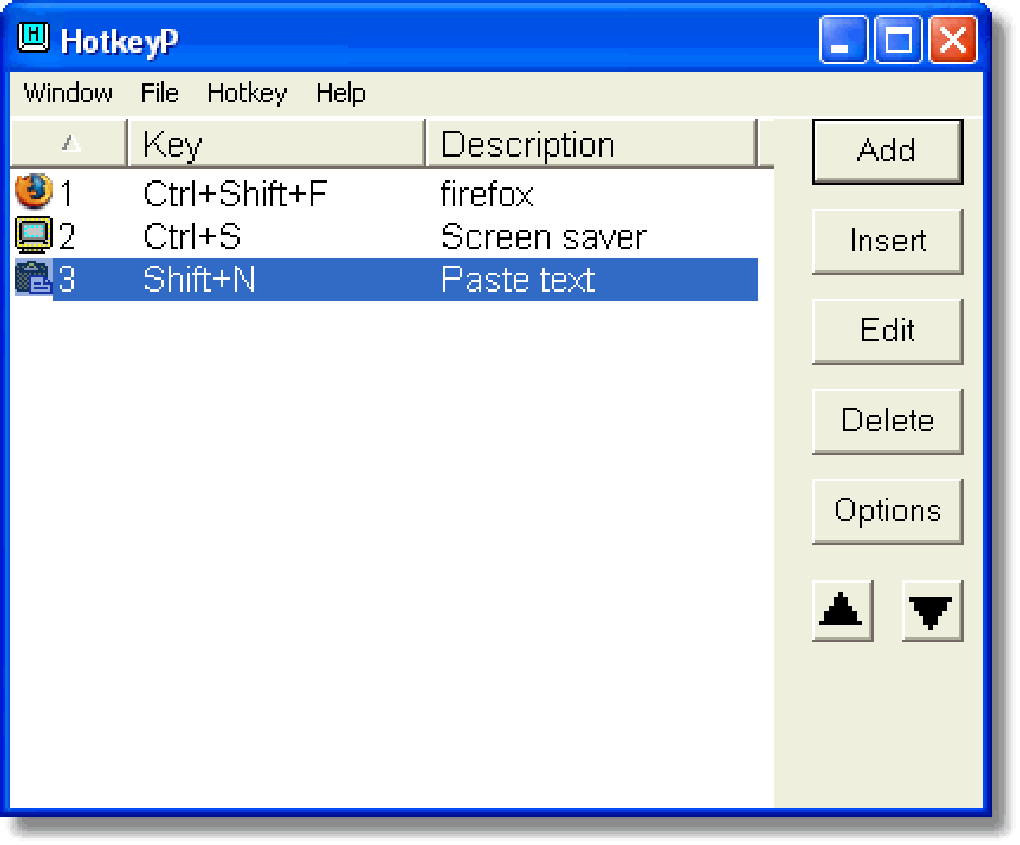
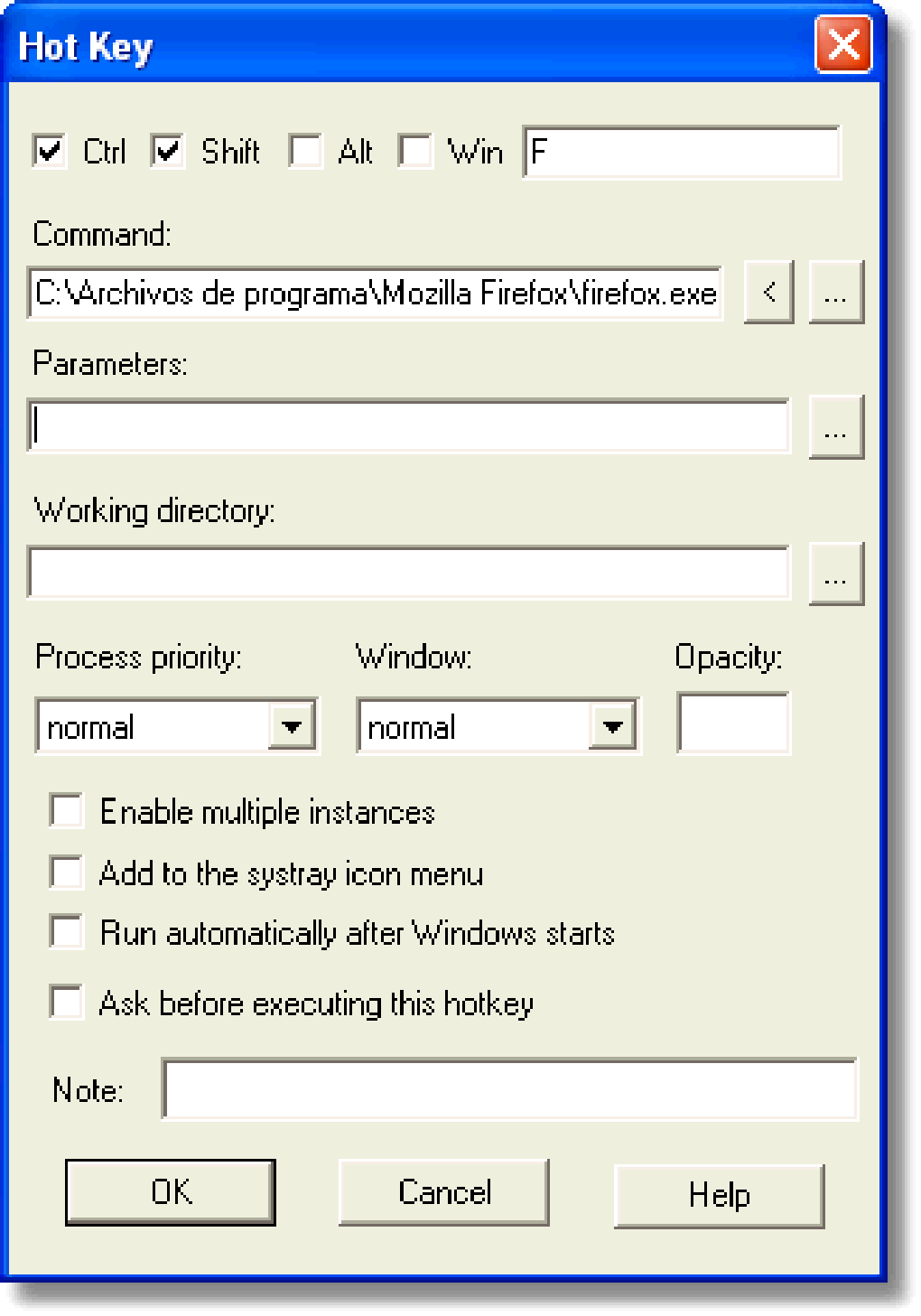
To configure your first hotkey, right-click the HotkeyP icon in the tray and select "Edit Hotkeys." This opens a clean, intuitive interface where you can assign a key combination (e.g., Ctrl+Shift+L) to a specific command. Choose from a wide list of built-in functions such as "Lock computer," "Delete temporary files," or "Save desktop icons." For custom actions, you can also link to external executables (EXE files) or scripts. The program automatically displays available parameters in the description column, helping you understand how to use each command effectively.
Once set, the hotkey is active immediately. For example, pressing Ctrl+Shift+L will lock your PC instantly. You can test and adjust shortcuts in real time. The software also includes a "Show text" feature that displays the current clipboard content when triggered, making it perfect for quick reference. Advanced users can leverage the "Spy" tool to monitor clipboard changes, window titles, or system variables. Overall, HotkeyP’s interface is user-friendly, even for those with limited technical experience. With regular updates and a stable performance, it remains a trusted tool for Windows users seeking a fast, secure way to automate daily tasks.
Compatibility & System Requirements
HotkeyP is designed with backward compatibility in mind, making it one of the most accessible keyboard shortcut tools for older Windows systems. It officially supports Windows 98 and earlier versions, which is rare among modern software utilities. This makes it an excellent choice for users running legacy hardware or environments where upgrading the OS isn’t feasible. Despite its age, the software remains functional on modern Windows 10 and Windows 11 systems, thanks to its lightweight architecture and minimal system resource usage.
The program is not resource-intensive, consuming only a small amount of RAM and CPU, which ensures it runs smoothly even on low-end machines. It does not require administrator privileges to install or run, making it suitable for shared or restricted user accounts. HotkeyP is available in English, with all interface elements and command descriptions clearly labeled. While it lacks support for newer platforms like macOS, Android, or iOS, its focus on Windows ensures deep integration with the operating system.
For users seeking a free, secure, and reliable tool to enhance productivity on Windows, HotkeyP delivers. Its long-standing presence in the software community—over 17 years since its initial release—speaks to its stability and trustworthiness. Whether you're in Bangladesh, Saudi Arabia, or any other country where lightweight tools are preferred, HotkeyP offers a dependable solution for automating common PC tasks without the need for complex scripting or third-party applications.
Pros and Cons of Using HotkeyP
- Pros:
- Free and open for download with no hidden costs
- Lightweight and fast, ideal for older or low-spec systems
- Supports legacy Windows versions including Windows 98
- Extensive list of built-in system commands (lock, clear, minimize, etc.)
- Intuitive interface with real-time testing and editing
- Includes a powerful Spy tool for monitoring system values
- Secure installation with no adware or bloatware
- Regular updates ensure stability and bug fixes
- Cons:
- Limited to Windows only—no Mac, Android, or iOS support
- Outdated UI design; lacks modern visual polish
- No built-in update checker (manual check required)
- Documentation is minimal and not beginner-friendly
- Not actively developed (last update in 2007), though still functional
Frequently Asked Questions (FAQ)
How do I download HotkeyP?
Visit a trusted software download site and search for "HotkeyP." Download the latest version, 4.3.1, which is available for free. The file is small and safe, with no ads or malware.
Is HotkeyP safe to use?
Yes, HotkeyP is a secure, free tool that has been downloaded over 3,000 times since 2006. It does not contain spyware or adware. Always download from reputable sources to ensure authenticity.
Can I use HotkeyP on Windows 10 or 11?
Yes, despite being last updated in 2007, HotkeyP runs on modern Windows 10 and 11 systems without issues. Its lightweight design ensures compatibility with newer hardware.
What are some useful hotkey commands?
Popular commands include "Lock computer," "Delete temporary files," "Minimize to tray," "Save desktop icons," and "Show text" with clipboard content. You can also create custom shortcuts for scripts or EXE files.
Can I assign multiple text strings to one hotkey?
Yes, use the "Paste text" command with multiple strings separated by %| (e.g., "Hello%|Goodbye"). This is perfect for inserting frequently used phrases.
Final Verdict: Is HotkeyP Worth Downloading?
Despite its age, HotkeyP remains a valuable tool for Windows users who want to boost productivity with simple keyboard shortcuts. Its ability to automate essential system functions—like locking the PC, clearing temp files, or managing desktop icons—makes it a must-have for both casual and power users. The software is free, secure, and lightweight, with no bloat or unnecessary features. While it lacks modern design and active development, its core functionality is rock-solid and reliable.
If you're looking for a no-cost, efficient way to streamline your workflow on Windows, HotkeyP is an excellent choice. Download it today and start customizing your PC’s behavior with just a few keystrokes.
Download HotkeyP now and take control of your Windows experience with powerful keyboard shortcuts.
Guides & Tutorials
How to install HotkeyP
- Click the Download button above.
- Once redirected, accept the terms and click Install.
- Wait for the HotkeyP download to finish on your device.
How to use HotkeyP
This software is primarily used for its core features described above. Open the app after installation to explore its capabilities.
User Reviews
No reviews yet. Be the first to share your experience.
You may also like
more
Llama 2
Free-to-use large language model As the new addition to Meta’s arsenal of langua...

NotebookLM
Revolutionizing the note-taking and idea-generation process NotebookLM is an exp...

Github co pilot
AI-inspired software development and coding platform GitHub Copilot is a browser...

Google Gemma
Google’s lightweight AI models Introducing Google Gemma , a family of cutting-ed...

AI Image Enlarger
A free app for Windows, by ai-image-larger. AI Image Enlarger is a free software...

DALL E
AI-driven text-to-image transformation engine DALL·E is a free graphic and desig...